


路由 (导航菜单)
路由配置存放在 apps/<app>/src/router/modules/ 目录下,每一个 ts 文件被视为一个路由模块,所有路由模块最终会在 apps/<app>/src/router/routes.ts 文件里引入并放到不同的主导航菜单下。
最终,路由数据会自动生成导航菜单。
基本配置
二级路由
一个最常见的路由模块可参考以下结构:
import type { RouteRecordRaw } from 'vue-router'

const routes: RouteRecordRaw = {
  path: '/example',
  component: () => import('@/layouts/index.vue'),
  redirect: '/example/index',
  name: 'Example',
  meta: {
    title: '演示',
  },
  children: [
    {
      path: 'index',
      name: 'ExampleIndex',
      component: () => import('@/views/example/index.vue'),
      meta: {
        title: '演示页面',
      },
    },
  ],
}

export default routes
注意
- 所有路由的
name请确保唯一,不能重复 - 一级路由的
component需设置为() => import('@/layouts/index.vue'),并且 path 前面需要加/,其余子路由都不要以/开头
多级路由
说明
多级路由的中间层级,无需设置 component ,其原因可阅读《关于 KeepAlive 多级路由缓存问题的终极解决方案》。
import type { RouteRecordRaw } from 'vue-router'

const routes: RouteRecordRaw = {
  path: '/example',
  component: () => import('@/layouts/index.vue'),
  redirect: '/example/level/index',
  name: 'Example',
  meta: {
    title: '演示',
  },
  children: [
    {
      path: 'level',
      name: 'ExampleLevel',
      // 无需设置 componment
      meta: {
        title: '中间层级',
      },
      children: [
        {
          path: 'index',
          name: 'ExampleLevelIndex',
          component: () => import('@/views/example/index.vue'),
          meta: {
            title: '演示页面',
          },
        },
      ],
    },
  ],
}

export default routes
主导航菜单
主导航菜单并非路由的一部分,它只是将路由模块进行归类,这样设计的优势在于可以方便调整单个路由模块的展示位置,并且不会影响路由路径。
在 apps/<app>/src/router/routes.ts 里进行设置:
const asyncRoutes: Route.recordMainRaw[] = [
  {
    meta: {
      title: '演示',
      icon: 'menu-default',
    },
    children: [
      MultilevelMenuExample,
      BreadcrumbExample,
      KeepAliveExample,
    ],
  },
  {
    meta: {
      title: '其它',
      icon: 'menu-other',
    },
    children: [
      ComponentExample,
      PermissionExample,
    ],
  },
]
主导航菜单只需设置 meta 和 children 两个参数,其中 meta 接受 auth、localeAuth、title、icon、badge 参数,children 则是存放不同的路由模块。
导航菜单配置
框架的核心是通过路由数据生成导航菜单,所以除了路由的基本配置外,框架还提供了针对导航的自定义配置,这些配置都存放在 meta 元信息里。
auths 专业版
/**
 * 权限池
 * @description 对路由本身无实际作用,通常用于角色管理模块,展示路由可配置权限
 * @default undefined
 * @example
 * [
 *   { name: '新闻管理(浏览)', value: 'news:view' },
 *   { name: '新闻管理(编辑)', value: 'news:edit' }
 * ]
 */
auths?: {
  name: string
  value: string
}[]
注意
auths里需包含auth所设置的权限,否则可能会出现无法设置该路由的访问权限。auths的存放位置并不固定,可以放在任意一级路由上,但通常建议放在某个模块的入口路由上,表示该模块下所有子路由具备的可配置权限。
权限池存放了该路由相关的所有权限,包括但不限于:访问权限、按钮权限、颗粒度更细的权限等。以下是一个示例:
import type { RouteRecordRaw } from 'vue-router'

const routes: RouteRecordRaw = {
  path: '/news',
  component: () => import('@/layouts/index.vue'),
  meta: {
    title: '新闻管理',
    auths: [
      { name: '浏览', value: 'browse' },
      { name: '新增', value: 'add' },
      { name: '编辑', value: 'edit' },
      { name: '删除', value: 'delete' },
      { name: '导出', value: 'export' },
      { name: '导入', value: 'import' },
    ],
  },
  children: [
    {
      path: 'list',
      component: () => import('@/views/news/list.vue'),
      meta: {
        title: '新闻列表',
        auth: 'browse',
      },
    },
    {
      path: 'detail',
      component: () => import('@/views/news/detail.vue'),
      meta: {
        title: '新闻详情',
        menu: false,
        activeMenu: '/news/list',
        auth: 'browse',
      },
    },
  ],
}

export default routesauth
/**
 * 权限
 * @description 路由访问权限,配置为数组时,只需满足一个即可进入
 * @default undefined
 * @example
 * 'news:view' - 访问该路由时,需要具备 news:view 权限
 * ['news:view', 'news:edit'] - 访问该路由时,需要具备 news:view 或 news:edit 权限
 */
auth?: string | string[]
用户在访问路由时,会判断当前路由是否具备访问权限,不具备访问权限则会显示 403 页面,详细可阅读《权限 - 路由权限》。
如果在某个多级路由的多个层级上均设置了 auth ,则框架会依次判断,必须每一层级都具备访问权限,才能访问该路由。
import type { RouteRecordRaw } from 'vue-router'

const routes: RouteRecordRaw = {
  path: '/system',
  meta: {
    title: '系统管理',
  },
  children: [
    {
      path: 'department',
      meta: {
        title: '部门管理',
        auth: 'a',
      },
      children: [
        {
          path: 'job',
          meta: {
            title: '职位管理',
          },
          children: [
            {
              path: 'member',
              meta: {
                title: '人员管理',
                auth: 'b', // 只有当用户权限里同时含有 a 和 b 时,才能访问该路由
              },
            },
          ],
        },
      ],
    },
  ],
}

export default routes
localeAuth 专业版
/**
 * 区域权限
 * @description 区域语言权限,配置为数组时,只需满足一个即可进入
 * @default undefined
 * @example
 * 'zh-cn' - 当前区域语言为 zh-cn 允许访问该路由
 * ['zh-cn', 'zh-tw'] - 当前区域语言为 zh-cn 或 zh-tw 允许访问该路由
 */
localeAuth?: string | string[]
在做国际化业务场景时,可以对某个路由做区域访问限制。
const asyncRoutes: RouteRecordMainRaw[] = [
  {
    meta: {
      title: 'UI',
      icon: 'i-whh:jqueryui',
      localeAuth: ['zh-cn', 'zh-tw'],
    },
    children: [
      ElementPlusExample,
    ],
  },
]
singleMenu 专业版
/**
 * 单个一级导航
 * @description 该配置用于简化只想展示一级,没有二级导航的路由配置。
 * @default false
 */
singleMenu?: boolean
注意
该配置只能在一级路由上设置才会生效。
如果要在次导航菜单里,展示一个没有二级导航菜单的路由配置,通常需要这样:
import type { RouteRecordRaw } from 'vue-router'

const routes: RouteRecordRaw = {
  path: '/test',
  component: () => import('@/layouts/index.vue'),
  meta: {
    title: '测试页面',
  },
  children: [
    {
      path: '',
      name: 'test',
      component: () => import('@/views/test/index.vue'),
      meta: {
        title: '测试页面',
        menu: false,
        breadcrumb: false,
      },
    },
  ],
}

export default routes
而通过该配置项可以大幅简化代码,框架内部会帮你进行转换。
import type { RouteRecordRaw } from 'vue-router'

const routes: RouteRecordRaw = {
  path: '/test',
  name: 'test',
  component: () => import('@/views/test/index.vue'),
  meta: {
    title: '测试页面',
    singleMenu: true,
  },
}

export default routes
title
/**
 * 标题
 * @description 标题会在导航、标签页、面包屑等需要的展示位置显示
 * @default undefined
 * @example
 * '新闻管理' - 标题为新闻管理
 */
title?: string | (() => string)icon
/**
 * 图标
 * @description 如果配置为数组,则第一个为默认图标,第二个为激活图标
 * @default undefined
 * @example
 * 'i-ep:lock' - 默认显示 i-ep:lock 图标
 * ['i-ep:lock', 'i-ep:unlock'] - 默认显示 i-ep:lock 图标,激活时显示 i-ep:unlock 图标
 */
icon?: string | [string, string]
注意
激活图标仅在专业版提供支持
该项配置最终会通过 FaIcon 组件进行展示,意味着你可以使用自定义图标,也可使用 Iconify 提供的图标,详细可阅读《图标》。
query 专业版
/**
 * 路由 query 参数
 * @description 点击导航时进行路由跳转时,携带的参数
 * @default undefined
 * @example
 * { id: 1, name: 'test' } - 点击导航时,携带 id 参数为 1,name 参数为 test
 */
query?: Record<string, any>
menu
/**
 * 是否在导航菜单中显示
 * @description 当子导航菜单里没有可展示的导航菜单时,会直接显示父导航菜单
 * @default true
 */
menu?: boolean
当子导航菜单里没有可展示的导航菜单时,会直接显示父导航菜单,例如:
import type { RouteRecordRaw } from 'vue-router'

const routes: RouteRecordRaw = {
  path: '/style_example',
  component: () => import('@/layouts/index.vue'),
  meta: {
    title: '风格实验室',
    icon: 'i-ion:dice',
  },
  children: [
    {
      path: '',
      name: 'styleExample',
      component: () => import('@/views/style_example/index.vue'),
      meta: {
        title: '风格实验室',
        menu: false,
        breadcrumb: false,
      },
    },
  ],
}

export default routes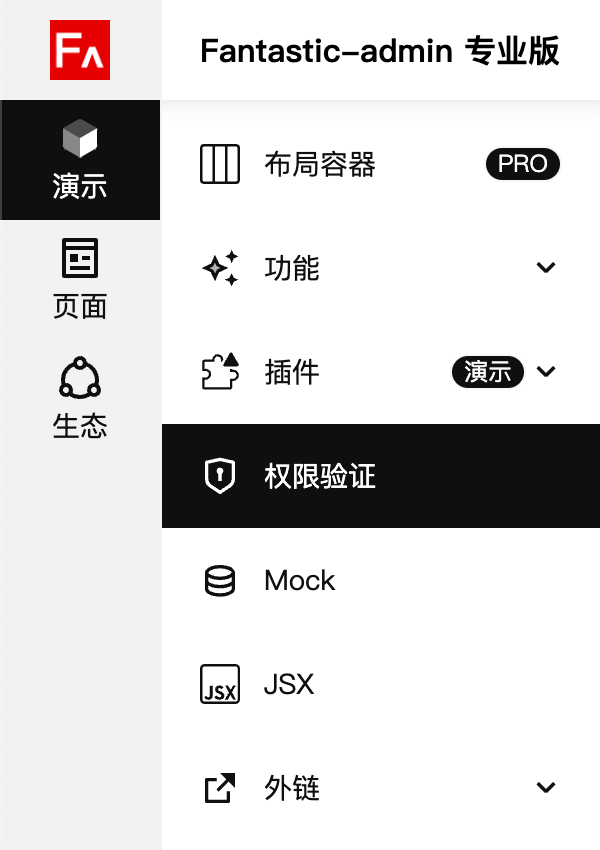
activeMenu
/**
 * 高亮导航菜单
 * @description 需要设置完整路由地址
 * @default undefined
 * @example '/news/list'
 */
activeMenu?: string
需搭配 menu: false 一起使用,因为子导航菜单不显示,会导致进入该导航菜单路由后,导航菜单高亮效果失效,所以需要手动指定。
import type { RouteRecordRaw } from 'vue-router'

const routes: RouteRecordRaw = {
  path: '/news',
  component: () => import('@/layouts/index.vue'),
  meta: {
    title: '新闻管理',
  },
  children: [
    {
      path: 'list',
      component: () => import('@/views/news/list.vue'),
      meta: {
        title: '新闻列表',
      },
    },
    {
      path: 'detail',
      component: () => import('@/views/news/detail.vue'),
      meta: {
        title: '新闻详情',
        menu: false,
        activeMenu: '/news/list',
      },
    },
  ],
}

export default routes
expand
/**
 * 是否默认展开
 * @description 如果配置为数组,则第一个为默认展开状态,第二个是否始终展开
 * @default undefined
 * @example
 * true - 默认展开
 * [true, true] - 默认展开,且不允许收起
 */
expand?: boolean | [boolean, boolean]
注意
是否始终展开仅在专业版提供支持
该特性仅在 顶部模式 / 侧边栏模式(含主导航菜单) / 侧边栏模式(无主导航菜单) 下生效。
使用该特性时,建议在应用配置中关闭 menu.subMenuUniqueExpand 。
badge
/**
 * 徽章
 * @description 如果配置为数组,则第一个为徽章内容,第二个为徽章颜色
 * @default undefined
 * @example
 * 'PRO' - 显示徽章,内容为 PRO
 * [true, 'destructive'] - 显示徽章,内容为圆点,颜色为 'destructive'
 */
badge?:
  boolean | string | number | (() => boolean | string | number)
  | [
    boolean | string | number | (() => boolean | string | number),
    'default' | 'secondary' | 'destructive' | (() => 'default' | 'secondary' | 'destructive'),
  ]
注意
徽章颜色仅在专业版提供支持
设置不同的类型值,展示效果也会不同:
boolean展示形式为点,当值为 false 时隐藏number展示形式为文本,当值小于等于 0 时隐藏string展示形式为文本,当值为空时隐藏
如果标记需要动态更新,请设置为箭头函数形式,并返回外部变量,例如搭配 pinia 一起使用。
badge: () => globalStore.numbersort 专业版
/**
 * 导航排序
 * @description 数字越大越靠前
 * @default 0
 */
sort?: number
breadcrumb
/**
 * 是否在面包屑中显示
 * @description 是否在面包屑导航中显示
 * @default true
 */
breadcrumb?: boolean
tabPermanent 专业版
/**
 * 是否常驻标签页
 * @description 请勿在带有参数的路由上设置该特性
 * @default false
 */
tabPermanent?: boolean
使用该特性时,需要在应用配置中开启 tabbar.enable 设置,同时需注意,请勿在带有参数的路由上设置该特性。
tabMerge 专业版
/**
 * 标签页合并
 * @description 根据规则合并标签页
 * @default undefined
 * @example
 * 'routeName' - 根据路由名称合并
 * 'activeMenu' - 根据 activeMenu 属性合并
 */
tabMerge?: 'routeName' | 'activeMenu'const routes: RouteRecordRaw = {
path: '/manager',
meta: {
title: '管理员管理',
},
children: [
{
path: '',
name: 'ManagerList'
meta: {
title: '管理员列表',
},
},
{
path: 'detail/:id',
name: 'ManagerEdit',
meta: {
title: '编辑管理员',
menu: false,
activeMenu: '/manager',
},
},
],
}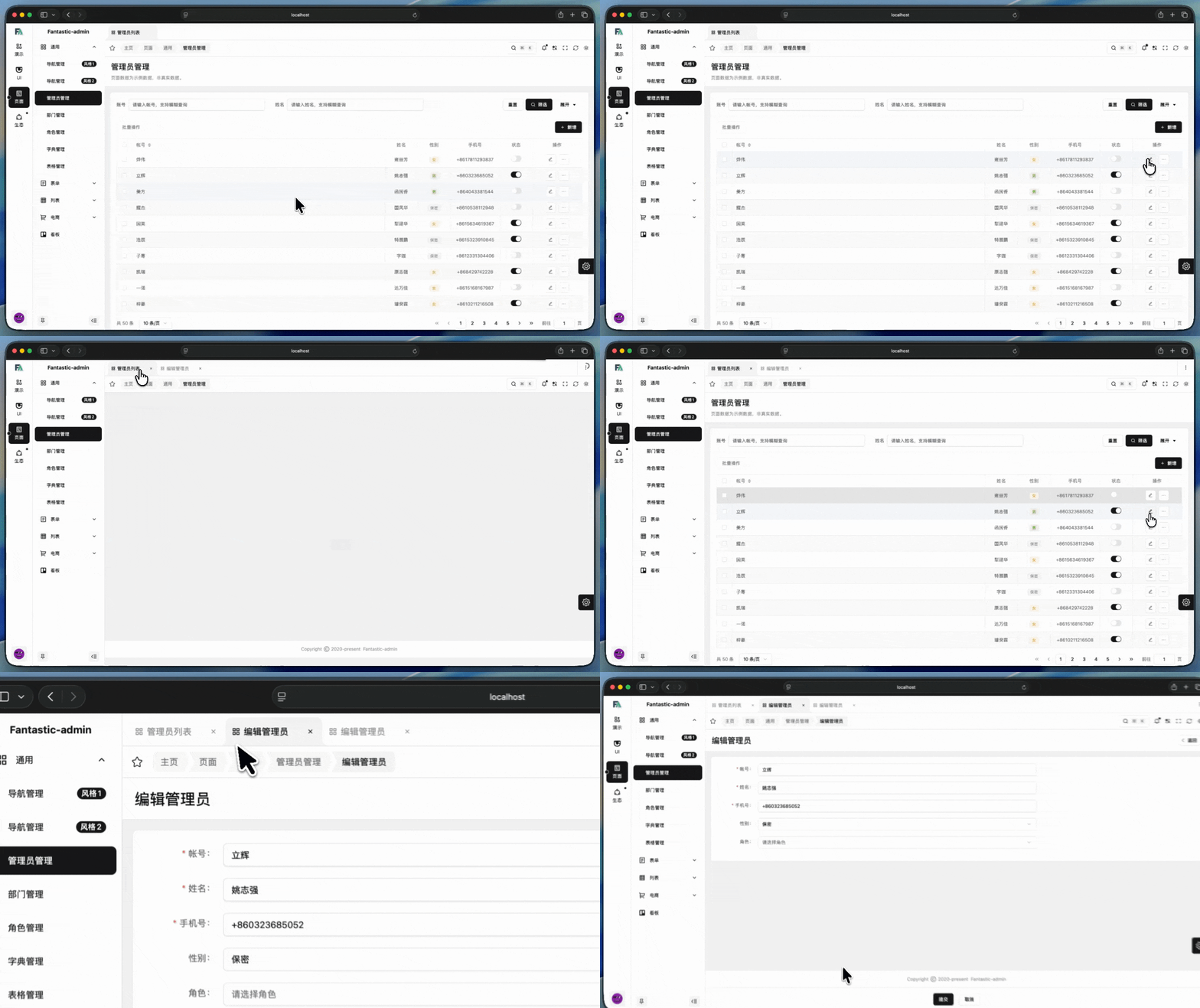
从列表页进入详情页时,会新增一个编辑管理员的标签页,返回列表页并进入其他详情页,会继续新增一个编辑管理员的标签页。
keepAlive
/**
 * 保活
 * @description 根据规则保活当前路由页面
 * @default undefined
 * @example
 * true - 始终保活
 * 'news' - 访问路由name为news的页面时保活
 * ['news', 'user'] - 访问路由name为news或user的页面时保活
 */
keepAlive?: boolean | string | string[]
设置不同的类型值,可满足不同场景的保活需求:
boolean设置为 true 时,该路由页面始终保活string设置某个目标路由的 name ,表示当前路由跳转到目标路由时,会将当前页面进行保活,否则不保活string[]可设置一个目标路由的 name 数组
当类型为 string 或 string[] 时,可以更精细的去控制页面保活的逻辑。例如从列表页进入详情页,则需要将列表页进行保活;而从列表页进入其它页面,则无需将列表页进行保活。详细可阅读《页面保活 - 基础用法》。
noKeepAlive
/**
 * 不保活
 * @description 根据规则不保活当前路由页面
 * @default undefined
 * @example
 * 'news' - 访问路由name为news的页面时不保活
 * ['news', 'user'] - 访问路由name为news或user的页面时不保活
 */
noKeepAlive?: string | string[]
设置不同的类型值,可满足不同场景的保活需求:
string设置某个目标路由的 name ,表示当前路由跳转到目标路由时,则将当前页面清除保活,否则不清除保活string[]可设置一个目标路由的 name 数组
该属性通常在启用标签栏合并时会使用到。详细可阅读《页面保活 - 高级用法》。
maximize 专业版
/**
 * 最大化
 * @description 如果配置为数组,则第一个为是否开启最大化,第二个为是否允许手动退出最大化
 * @default undefined
 * @example
 * true - 开启最大化
 * [true, false] - 开启最大化,允许手动退出最大化
 * [true, true] - 开启最大化,不允许手动退出最大化
 */
maximize?: boolean | [boolean, boolean]
访问该路由时,是否最大化业务页面组件展示区。
newWindow 专业版
/**
 * 新窗口
 * @description 是否在新窗口打开
 * @default false
 */
newWindow?: boolean
该设置仅在导航菜单里点击生效。
iframe 专业版
/**
 * iframe
 * @description 是否在iframe中打开
 * @default undefined
 * @example
 * 'https://fantastic-admin.hurui.me' - 在iframe中打开 Fantastic-admin 官网
 * true - 获取路由query中的iframe属性,并在iframe中打开
 */
iframe?: string | boolean
内嵌网页无需设置 component ,但需设置 redirect 和 name 属性,如果同时设置了 meta.link 则 meta.link 优先级更高。
import type { RouteRecordRaw } from 'vue-router'

const routes: RouteRecordRaw = {
  path: '/xxx',
  component: () => import('@/layouts/index.vue'),
  redirect: '/xxx/iframe',
  meta: {
    title: '内嵌网页',
  },
  children: [
    {
      path: 'iframe',
      redirect: '',
      name: 'Iframe',
      meta: {
        title: 'Gitee 仓库',
        iframe: 'https://gitee.com/fantastic-admin/basic',
      },
    },
  ],
}

export default routes
内嵌网页同样支持使用 keepAlive 和 noKeepAlive 属性来开启页面保活,但考虑到 <iframe> 本身的性能问题,框架默认提供最大保活数量为 3 个,超过 3 个则会自动清除最早的保活页面。
如果需要修改最大保活数量,请在应用配置中设置:
export default setSettings({
  page: {
    iframeKeepAliveMax: 3,
  },
})
iframe 支持动态设置外部链接,只需要配置一份如下路由:
import type { RouteRecordRaw } from 'vue-router'

const routes: RouteRecordRaw = {
  path: '/xxx',
  component: () => import('@/layouts/index.vue'),
  redirect: '/xxx/iframe',
  meta: {
    title: '内嵌网页',
  },
  children: [
    {
      path: 'iframe',
      redirect: '',
      name: 'Iframe',
      meta: {
        title: 'Gitee 仓库',
        iframe: 'https://gitee.com/fantastic-admin/basic',
      },
    },
    {
      path: 'dynamic',
      redirect: '',
      name: 'Dynamic',
      meta: {
        title: '外部链接',
        menu: false,
        iframe: true,
      },
    },
  ],
}

export default routes
然后就可以通过跳转路由的方式动态设置 iframe 链接了:
const router = useRouter()

router.push({
  name: 'Dynamic',
  // 这里需要使用到 query 参数,且约定参数名为 title 和 iframe
  query: {
    title: '自定义标题', // 非必须,默认使用该路由的 meta.title
    iframe: 'https://fantastic-admin.hurui.me/', // 必须
  },
})
link
/**
 * 外部链接
 * @description 会在浏览器新窗口访问该链接
 * @default undefined
 * @example
 * 'https://fantastic-admin.hurui.me' - 在浏览器新窗口打开 Fantastic-admin 官网
 */
link?: string
外部链接无需设置 component ,但需设置 redirect 和 name 属性。
import type { RouteRecordRaw } from 'vue-router'

const routes: RouteRecordRaw = {
  path: '/xxx',
  component: () => import('@/layouts/index.vue'),
  redirect: '/xxx/link',
  meta: {
    title: '外部链接',
  },
  children: [
    {
      path: 'link',
      redirect: '',
      name: 'Link',
      meta: {
        title: 'Gitee 仓库',
        link: 'https://gitee.com/fantastic-admin/basic',
      },
    },
  ],
}

export default routes
layout 专业版
/**
 * 布局
 */
layout?: {
  /**
   * 是否居中
   * @description 如果不设置,则使用全局配置
   * @default undefined
   */
  center?: boolean
  /**
   * 作用范围
   * @description 如果不设置,则使用全局配置
   * @default undefined
   */
  centerScope?: 'inner' | 'outer'
  /**
   * 宽度
   * @description 如果不设置,则使用全局配置
   * @default undefined
   */
  centerWidth?: number
}
该设置比应用配置里的 app.layout 优先级高,不设置则继承应用配置里的设置。
copyright 专业版
/**
 * 是否显示版权
 * @description 如果不设置,则使用全局配置
 * @default undefined
 */
copyright?: boolean
该设置比应用配置里的 app.copyright.enable 优先级高,不设置则继承应用配置里的设置。
whiteList 专业版
/**
 * 免登白名单
 * @description 开启后无需登录即可访问,仅支持在固定路由上生效
 * @default false
 */
whiteList?: boolean
这个设置比较特殊,因为基于后台框架的页面基本上都是需要登录后才能访问,如果希望增加免登录的页面(白名单页面),也就是脱离框架本身,相对独立的页面,你可以按照下面的方式处理:
首先在 /src/router/routes.ts 里 constantRoutes 配置免登录页面的路由,然后在 meta 对象里设置 whiteList: true ,例子如下:
const constantRoutes: RouteRecordRaw[] = [
  {
    path: '/no/login/example',
    name: 'noLoginExample',
    component: () => import('@/views/no-login-example.vue'),
    meta: {
      title: '免登录页面',
      whiteList: true,
    },
  },
]需要注意,请勿在系统路由和动态路由上设置该属性,因为这里面的路由,它们的一级路由调用的是 Layout 组件,而 Layout 组件是必须登录才能正常使用。